Seedr V2 audio player — play music from your cloud
Was this article helpful?
Related Articles
Downloading vs streaming in Seedr — when to use each
The old choice between "download the file" and "stream it" used to be a hard either-or. Seedr collapses both into one library: your files sit in the cloud, and you either press Play or press Save. This article is about when to use each, how to do both inside Seedr,
Playback speed control in Seedr V2
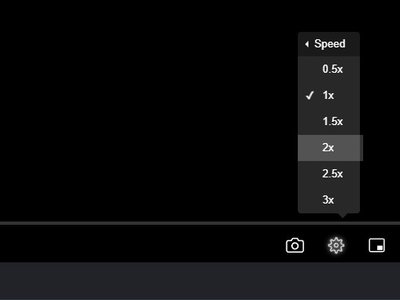
Seedr V2's browser player now supports playback speeds from 0.5x to 3x. Slow a tutorial down to catch a step. Skim a lecture at 1.5x. Switch speeds mid-video without reloading. Why we built this Fixed-speed playback is a hassle in three situations people hit often: • Tutorials and lectures —
What to Do While Seedr Is Saving Your Files
The one-sentence answer Close the tab and go do something else. Seedr saves to the cloud, not to your device, so your machine doesn't need to be on. When you come back, the files are waiting in your account. Why this is different from a regular download A regular download