Latest Updates

Explore latest updates in our Blog

Merge PDF files online — free and no software needed

Merge PDF files online — free and no software needed

You have three documents. The person waiting needs one file. That gap — between what you have and what you need to send — is what this is for. No software, no watermarks, no subscription wall before you can do anything useful. PDF merging is part of Seedr V2's document

Edit PDF online — free and no software needed

Edit PDF online — free and no software needed

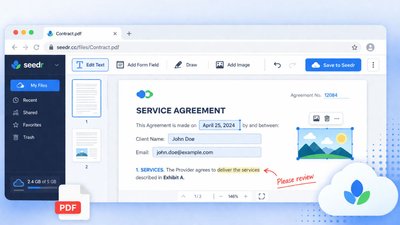
Edit PDF online — free and no software needed Open any PDF, make your changes, save it back to your cloud. No Acrobat, no printing, no scanning anything back in. Everything happens in your browser — no new tab, no new account, no new tool to remember. PDF editing is

Why won't my iPhone photos open on Windows or Android

Why won't my iPhone photos open on Windows or Android

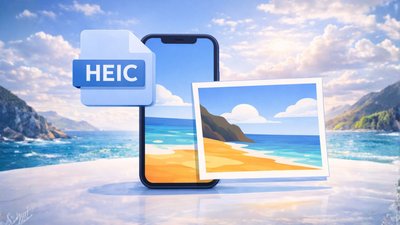
Seedr opens HEIC files directly in your cloud viewer — no conversion, no codec installation, no third party app. Upload your iPhone photos and they open instantly in your browser, on any device. Check Premium for more space What is HEIC and why does it exist HEIC stands for High

How To: Connect Seedr and Infuse with WebDAV (or FTP)

How To: Connect Seedr and Infuse with WebDAV (or FTP)

There are several reasons why you might want to connect Seedr and Infuse. For instance, you may have a massive collection of media files stored on Seedr, a cloud-based downloading and streaming service, and wish to access them through Infuse's beautiful, user-friendly interface on your Apple TV, iOS, or Mac

How to add links & files into Seedr V2

How to add links & files into Seedr V2

Getting your files into your cloud storage should be the easiest part of your day. With Seedr V2, we've completely removed the friction of constantly switching tabs or dealing with complex setups to get your content where it needs to be. Whether you're on your phone on the go, or

How to watch cloud videos offline: introducing Seedr V2 Offline Mode

How to watch cloud videos offline: introducing Seedr V2 Offline Mode

The flight attendant says "Airplane Mode." Everyone else sighs, putting away their phones or frantically scrolling through cached web pages. You just hit Play. Your movies were saved for offline viewing this morning. No buffering, no desperate search for airport WiFi. If you've ever looked for a way to watch

How to unzip files online without installing anything

How to unzip files online without installing anything

Upload a ZIP file to Seedr V2, right-click it, and extract what you need. The files appear in your cloud instantly, ready to open, save, or organize. No WinZip, no 7-Zip, no software of any kind. When this is useful One situation is a borrowed or restricted device — a

How to Mount Seedr Like a Drive (FTP, SFTP & WebDAV)

How to Mount Seedr Like a Drive (FTP, SFTP & WebDAV)

If you want Seedr to feel like real storage on your device, mounting is the cleanest way to do it. Seedr supports FTP , SFTP , and WebDAV connections on Premium plans. That means you can mount your Seedr storage as a drive letter (Windows) or a normal folder path

How to Use the New Seedr Plugin on Roku

How to Use the New Seedr Plugin on Roku

This is a fresh Seedr update, built while we were deep in the Seedr V2 work. And it’s one of those features users kept asking for — especially Roku users. Roku has always been a bit special when it comes to apps. It’s fast, stable, and popular — but also

How to fetch only the files you actually need from a link

How to fetch only the files you actually need from a link

You open a link because you need one thing. A little later, your cloud is filling up with folders you never planned to use. Cleanup becomes a future problem. V2 is designed to stop that from happening. Picking files before anything starts When you add a link in V2, you

Making Seedr feel lighter: smoother video and quicker fetches

Making Seedr feel lighter: smoother video and quicker fetches

Over the past days, we've been working on parts of Seedr that usually stay in the background — until something doesn't feel quite right. This wasn't about adding new features or changing how you use the product. It was about reducing friction in everyday scenarios: long sessions, large files, skipping

Seedr API: Getting More Accessible

Seedr API: Getting More Accessible

We’ve been using it for our *arr integrations (Sonarr/Radarr), and for the new Roku and Emby apps. All of these talk to Seedr through the same API — the very one we’re now opening a bit wider to you. Originally, this API lived behind a quiet early gate: tell us

How to view and organize your images online without installing software

How to view and organize your images online without installing software

How to view and organize your images online without installing software Upload an image to Seedr, click it, and it opens. No app to install, no software to save, no file to transfer to another device first. The viewer is built in, it works in your browser, and it handles

Save to your device or view in the cloud — which way to watch?

Save to your device or view in the cloud — which way to watch?

Save to your device or view in the cloud — which way to watch? Some people like keeping a local copy they can rename, move, and back up. Others just want to press Play. Seedr does both — one cloud, one library, two ways to watch. Save to your device

Pick the fastest Seedr server: now live in V2

Pick the fastest Seedr server: now live in V2

Seedr is fast by default. But if you want extra predictability on the transfer from Seedr to your device, V2 now lets you run Check fastest to benchmark today's routes and pick your server manually. No auto-switching — you stay in charge. Ultra locations (where available) offer shorter paths and

Share to Seedr V2: add magnet links without copy-paste

Share to Seedr V2: add magnet links without copy-paste

You asked for it: Share to Seedr is here, live in V2. Add magnets from the page you’re on and the save starts right away—no copy-paste, no tab switching, any browser. Join V2 Alpha waitlist now Think of it as a tiny shortcut that removes the fiddly steps you kept

Chromecast & AirPlay, rebuilt in Seedr V2

Chromecast & AirPlay, rebuilt in Seedr V2

Casting feels fast now. We rewrote the engine, polished the UI, made reconnects quicker, and added a few things you’ve asked for: playlist & subtitle picking, audio casting, and TV-remote navigation. 4K is supported on Master (device/network permitting). Works great with Chromecast (including TVs with Google TV ) and Apple

Offline Play (coming soon in V2): save once, watch anywhere

Offline Play (coming soon in V2): save once, watch anywhere

We’ve been scratching a very specific itch: watching your stuff with zero signal. Planes. Trains. Basements where bars go to die. So yes—Offline Play is coming to Seedr V2. It’s a V2-only, Premium feature, rolling out soon while we keep polishing. Upgrade to Premium now What it does (in human

How to create a ZIP archive online

How to create a ZIP archive online

Select files in Seedr V2, right-click, create archive. Your files are compressed into a single ZIP in your cloud, ready to save or keep. No compression software, no desktop app, nothing to install. When you need this The clearest case is sending multiple files as one package. A folder of

Watch MKV online (and more) in your browser

Watch MKV online (and more) in your browser

Add SRT subtitles in seconds, change playback speed, view in 1080p or 4K—on any device in the renewed Seedr V2 Video Viewer. Seedr runs in your browser on phone, tablet, or laptop , so you can watch MKV online and view your own videos anywhere—no converters, no extra apps. Add

Try the Seedr API Playground (Early Access!)

Try the Seedr API Playground (Early Access!)

Full Read/Write access to Seedr V2 is now unlocked

Full Read/Write access to Seedr V2 is now unlocked

Seedr's V2 fresh Full Read + Write rollout turns your account into a true two-way drive—perfect for Plex, Sonarr/Radarr, NAS backups, etc. We've polished our FTP mounts for better speed & stability, added brand-new SFTP support, and enhanced WebDAV functionality for Master plan users. Who Gets What? Storage Feature Pro

How to open a RAR file without WinRAR

How to open a RAR file without WinRAR

Upload a RAR file to Seedr V2, right-click it, and extract what you need. The files appear in your cloud instantly, ready to open, save, or organize. No WinRAR, no license, no software of any kind. When this is useful One situation is a borrowed or restricted device — a

How to connect Seedr to Jellyfin via WebDav

How to connect Seedr to Jellyfin via WebDav

Many of you have asked for a clear, step-by-step walkthrough for connecting Seedr to Jellyfin via WebDAV—here it is! Follow along and you'll be viewing your Seedr library on any screen in minutes. Part 1 – Bridge Seedr ↔ RaiDrive 1. Install RaiDrive Head to www.raidrive.com → Download Free →

How to convert Word to PDF without Microsoft Office

How to convert Word to PDF without Microsoft Office

PDF is the safe format for sending — the file looks identical everywhere, on any device, in any country. Seedr V2 converts any Word document to PDF directly in your cloud, without Office installed and without installing anything at all. Unlock more space with Premium Plans When this comes up

Seedr PWA Announcement: A New Way to Access Your Files

Seedr PWA Announcement: A New Way to Access Your Files

Tired of slow browser-based file access? We're excited to introduce the Seedr PWA (Progressive Web App), designed to make your experience faster, smoother, and more app-like — without the need for app store saves. Whether you're on mobile or desktop, the PWA brings the best of Seedr to your fingertips.

How to convert DOCX to PDF online

How to convert DOCX to PDF online

PDF is the safe format for sending — it looks the same on every device, cannot be accidentally edited, and is accepted everywhere. DOCX is the working format. Seedr V2 converts any DOCX file to PDF directly in your cloud, from any device, in a few seconds. No Office, nothing

Scanning page for magnet links: you don't need to search and copy them by yourself

Scanning page for magnet links: you don't need to search and copy them by yourself

Are you frustrated with finding download links ? dealing with popup ads , and fake save buttons ? Seedr V2 has some pleasant surprises waiting! You can paste the URL from the browser bar into Seedr V2. We will find the links for you! • We are ramping up access

How to convert Word to PDF without Microsoft Office

How to convert Word to PDF without Microsoft Office

PDF is the safe format for sending — the file looks identical everywhere, on any device, in any country. Seedr converts any Word document to PDF directly in your cloud, without Office installed and without installing anything at all. When this comes up The clearest cases are documents where the

How To: connect Seedr with Plex via FTP

How To: connect Seedr with Plex via FTP

For those who love viewing their favorite media content seamlessly and efficiently, Seedr and Plex are a match made in heaven. Seedr, a popular cloud storage service, allows you to store and access files from anywhere. At the same time, Plex is a powerful media server that organizes your content

How To: connect Seedr and Plex with WebDAV

How To: connect Seedr and Plex with WebDAV

As our digital libraries continue to grow and expand, the need for efficient and seamless viewing solutions has become more important than ever. Whether you're a movie buff, a TV series enthusiast, or an avid listener of music and podcasts, having a streamlined and user-friendly platform to manage and access

How To: begin with Plex

How To: begin with Plex

Originally posted at August 19, 2024 If you’re someone who loves consuming media but struggles to keep track of your collection, then Plex might just be the solution you’ve been looking for. Plex is a media server software that allows you to organize, view, and share all your media files

Customizable Playback Speeds in Seedr V2 client and how this feature will help you

Customizable Playback Speeds in Seedr V2 client and how this feature will help you

Originally posted at April 10, 2024 A bit more about V2 and what features are already available to alpha testers and will soon be available to everyone: playback speeds. Playback speed controls are a common feature in media players, video platforms, and content consumption apps. Providing users with the ability

Seedr’s Recent Upgrades: A Faster, More Stable, and Mobile-Friendly Platform

Seedr’s Recent Upgrades: A Faster, More Stable, and Mobile-Friendly Platform

Originally posted at March 29, 2024 We’re excited to share some updates with you that we think you’ll appreciate. Our team has been working hard to improve the platform and make your experience even better. Here’s what’s new. Read more or buy Premium right now to have more space and

Upcoming Seedr’s Audio Player: nothing except music

Upcoming Seedr’s Audio Player: nothing except music

Originally posted at March 26, 2024 Cloud-based audio viewing has revolutionized the way we listen to music. With the help of cloud technology, we can now store and access our audio libraries from anywhere, at any time, using any device with an internet connection. This convenience and flexibility have made

How To: Use Seedr’s Multi-Language Subtitles

How To: Use Seedr’s Multi-Language Subtitles

Originally posted at March 12, 2024 At Seedr, we understand that many of our users are avid video fans who enjoy watching content from all over the world. That’s why we’re constantly working on new features to make their viewing experience as seamless and enjoyable as possible. One of the

Introducing Dark Mode

Introducing Dark Mode

Originally posted March 10, 2024 We’re excited to announce that Seedr now offers a dark mode option! This highly requested feature allows users to switch to a darker color scheme, making it easier on the eyes in low light conditions. With dark mode enabled, the background of the Seedr interface...

Good news: Two month of Seedr for free

Good news: Two month of Seedr for free

Originally posted at February 21, 2024 Exciting news! We now offer Google Pay and Apple Pay as payment options. Plus, you get a special price when you purchase an annual subscription. Ready to save? Try our special price now. Want to learn more? Keep scrolling. Why do we add these

Our new Tasks Page and how it will help you

Our new Tasks Page and how it will help you

Originally posted at February 16, 2024 At Seedr, we’re always looking for ways to make saving large files easier and more convenient for our users. That’s why we’re excited to announce the launch of our new tasks page feature. In the past, in our view, Seedr’s page was a little

How Seedr Can Save You Time

How Seedr Can Save You Time

Originally posted at January 27, 2024 Imagine a world where you don’t have to wait for endless hours for a large file to save, relying on a stable internet connection. A world where you don’t have to deal with resuming or restarting saves. And a world where you don’t have

Tips: How To Better Use Seedr's Video Viewer

Tips: How To Better Use Seedr's Video Viewer

Originally posted at January 23, 2024 Welcome to our blog post on advanced tips and tricks for using Seedr’s built-in media player! If you’re looking for a powerful and versatile tool for media playback, look no further than Seedr’s media player. One of the biggest advantages of Seedr’s media player

Download Delays: How They Can Hinder Us

Download Delays: How They Can Hinder Us

What can I do while Seedr is saving my files

What can I do while Seedr is saving my files

Originally posted at January 4, 2023 In today’s fast-paced world, time is a valuable commodity. We are constantly looking for ways to optimize our productivity and make the most of every minute. One such way is by using Seedr’s save manager to effortlessly save files. But what can you do

Our New UI: First Look

Our New UI: First Look

Originally posted at Dec 29, 2023 In this blog post, we will delve into the key features of the new design and discuss how they contribute to a better and more streamlined user interface. Let us dive deep into the key improvements and discuss how they elevate the overall user

 Regarding Our Recent Downtime

Regarding Our Recent Downtime

How To: Use Seedr's Firefox Add-on

How To: Use Seedr's Firefox Add-on

Originally posted at June 14, 2022 What are browser add-ons and extensions? Add-ons and extensions make your browser more powerful. They are usually made by third parties, not by the company who created your browser. They can do a wide range of tasks and enhancements, including sharpening audio, creating and

How To: Use Seedr over FTP, feat. FileZilla

How To: Use Seedr over FTP, feat. FileZilla

Originally posted at May 12, 2022 Seedr's Pro and Master subscribers can enjoy the benefits of using Seedr over FTP. Follow the steps below and you will be using Seedr via FTP in no time. What is FTP? File Transfer Protocol, or FTP, is a protocol that originated in the

How to: View & View files

How to: View & View files

Originally posted at August 19, 2021 To view or view any file in your Seedr, click on the folder that contains the file you want to access. Repeat this until you see the file. Click on the file and it will open, load, and start playing (if relevant) immediately. If

How to: Use subtitles with OpenSubtitles

How to: Use subtitles with OpenSubtitles

Originally posted at August 19, 2021 Add subtitles Open the video you want to play. See our Beginner's tutorial for more details. Top right of the screen Click the grey square box in the top right of the Video Viewer with a magnifying glass and CC in it. Skip to

 How to: Upgrade your account

How to: Upgrade your account

Originally posted at August 19, 2021. Want more storage? The ability to save more files to your Seedr at once? Higher quality viewing? Support for private networks? FTP or WebDAV support? It's time to upgrade! Go to our plans page , or inside your Seedr click Upgrade Storage in the

How to: Invite friends and get more space

How to: Invite friends and get more space

How to: Find and organize your files in Seedr

How to: Find and organize your files in Seedr

Originally posted at August 19, 2021 . This is how to avoid all those moments when you don't remember where you put that one file you really need right now! This includes some tools you can use to organize your files for later. Search You can search all the names

How To: The Complete Seedr Chrome Extension Tutorial

How To: The Complete Seedr Chrome Extension Tutorial

Originally posted at August 19, 2021 This extension can be used in many browsers other than Chrome itself. The other browsers are based on Chromium , an open-source web browser codebase that is used as a foundation for Chrome and many other browsers. We have a partial list of the

 How To: Transfer files into your Seedr

How To: Transfer files into your Seedr

How To: Use Seedr. Beginner's Tutorial

How To: Use Seedr. Beginner's Tutorial

Originally posted at August 19, 2021 Welcome to Seedr! We get you your files anytime, anywhere, and on any device with an internet connection. The site has been optimized for mobile devices, so using our site with tablets and phones is easy and quick! Sign up Please start by signing

Stay Up To Date


Subscribe for our blog latest updates, promotions and more.